
RP-WH5000 - Hi-Fi System PANASONIC - Free user manual and instructions
Find the device manual for free RP-WH5000 PANASONIC in PDF.


| Product Type | Digital Cordless Surround Headphones System |
| Brand | Panasonic |
| Model | RP-WH5000 |
| Transmitter Dimensions (W x H x D) | 147 mm x 197 mm x 147 mm (5-13/16 in. x 7-3/4 in. x 5-13/16 in.) |
| Transmitter Weight | 334 g (11.8 oz) approx. |
| Headphones Weight (including batteries) | 312 g (11.0 oz) approx. |
| Power Supply (Transmitter) | DC 6 V via included AC adapter (AC 110-240 V, 50/60 Hz) |
| Power Consumption (Transmitter) | 10 W (standby approx. 1.3 W) |
| Headphones Power Source | Supplied Ni-MH rechargeable batteries or 2 x AA alkaline dry cell batteries |
| Charging Time (supplied batteries) | Approx. 16 hours |
| Operating Time (rechargeable batteries) | Approx. 20 hours |
| Operating Time (alkaline batteries) | Approx. 34 hours |
| Transmission System | Digital infrared transmission |
| Transmission Range | Up to approx. 8 m (26 ft.) |
| Audio Decoding | Dolby Digital, Dolby Pro Logic II, DTS, MPEG-2 AAC |
| Surround Modes | Music, Cinema, Voice |
| Inputs | 1 x Optical digital (TOS Link), 1 x Analog RCA (L/R) |
| Frequency Response | 18 Hz – 22,000 Hz |
| Auto Power On/Off | Yes (headphones and transmitter) |
| Maintenance | Wipe with a soft, dry cloth. Do not use alcohol, paint thinner, or benzine. |
| Supplied Accessories | AC adaptor (RFX5176), AC power cord, audio cable, optical digital cable, Ni-MH rechargeable batteries (2) |
Frequently Asked Questions - RP-WH5000 PANASONIC
User questions about RP-WH5000 PANASONIC
0 question about this device. Answer the ones you know or ask your own.
Ask a new question about this device
Download the instructions for your Hi-Fi System in PDF format for free! Find your manual RP-WH5000 - PANASONIC and take your electronic device back in hand. On this page are published all the documents necessary for the use of your device. RP-WH5000 by PANASONIC.
USER MANUAL RP-WH5000 PANASONIC
Before connecting, operating or adjusting this product, please read the instructions completely. Please keep this manual for future reference.
Thank you for purchasing this product.
For optimum performance and safety, please read these instructions carefully.
User memo:
DATE OF PURCHASE
DEALER NAME
DEALER ADDRESS
TELEPHONE NUMBER
Supplied Accessories
Use numbers indicated in parentheses when asking for replacement parts. "As of February 2005"
(Only for U.S.A.)
To order accessories contact 1-800-332-5368 or the website (http://www.pasc.panasonic.com).
Please check and identify the supplied accessories.
• AC adaptor (RFX5176)
1
• AC adaptor power cord
{K2CA2CA00025} .....1
- Audio cable
(K2KA4CA00002)
(Approximately 1.5 meters (5 ft.)
......1


• Nickel-metal hydride
rechargeable batteries
(RFKFHR162SA4)

.1 (2 Batteries)
• Optical digital cable
(K7CXJFA00001)
(Approximately 2 meters (6.5 ft.)

Replacement parts may differ from the above.
Table of contents
IMPORTANT SAFETY INSTRUCTIONS ....3
Features......4
Precautions....4
Listening caution....5
Control reference guide....5
Power Supply Preparations : Headphones
7
Using the rechargeable batteries (supplied) .....7
Using dry cell batteries (not Included) .....9
Connections......9
Connecting digital equipment.
Connecting analog equipment 10
Placement of transmitter and headphones
11
Using the transmitter and headphones ...12
Selecting the surround field.....15
Troubleshooting guide....16
Maintenance....19
Product service....19
Specifications ....19
Manufactured under license from Digital Theater Systems, Inc. U.S. Pat. No's. 5,451,942; 5,956,674; 5,974,380; 5,978,762; 6,487,535 and other U.S. and world-wide patents issued and pending. "DTS" and "DTS Virtual" are trademarks of Digital Theater Systems, Inc. Copyright 1996, 2003 Digital Theater Systems, Inc. All Rights Reserved.
Manufactured under license from Dolby Laboratories.
"DOLBY", "PRO LOGIC" and the double-D symbol are trademarks of Dolby Laboratories.
IMPORTANT SAFETY INSTRUCTIONS
Read these operating instructions carefully before using the unit. Follow the safety instructions on the unit and the applicable safety instructions listed below. Keep these operating instructions handy for future reference.
1) Read these instructions.
2) Keep these instructions.
3) Heed all warnings.
4) Follow all instructions.
5) Do not use this apparatus near water.
6) Clean only with dry cloth.
7) Do not block any ventilation openings. Install in accordance with the manufacturer's instructions.
8) Do not install near any heat sources such as radiators, heat registers, stoves, or other apparatus (including amplifiers) that produce heat.
9) Do not defeat the safety purpose of the polarized or grounding-type plug. A polarized plug has two blades with one wider than the other. A grounding-type plug has two blades and a third grounding prong. The wide blade or the third prong are provided for your safety. If the provided plug does not fit into your outlet, consult an electrician for replacement of the obsolete outlet.
10) Protect the power cord from being walked on or pinched particularly at plugs, convenience receptacles, and the point where they exit from the apparatus.
11) Only use attachments/accessories specified by the manufacturer.
12) Use only with the cart, stand, tripod, bracket, or table specified by the manufacturer, or sold with the apparatus. When a cart is used, use caution when moving the cart'apparatus combination to avoid injury from tip-over.

13) Unplug this apparatus during lightning storms or when unused for long periods of time.
14) Refer all servicing to qualified service personnel. Servicing is required when the apparatus has been damaged in any way, such as power-supply cord or plug is damaged, liquid has been spilled or objects have fallen into the apparatus, the apparatus has been exposed to rain or moisture, does not operate normally, or has been dropped.
WARNING:
TO REDUCE THE RISK OF FIRE, ELECTRIC SHOCK OR PRODUCT DAMAGE, DO NOT EXPOSE THIS APPARATUS TO RAIN, MOISTURE, DRIPPING OR SPLASHING AND THAT NO OBJECTS FILLED WITH LIQUIDS, SUCH AS VASES, SHALL BE PLACED ON THE APPARATUS.
Marking sign is located on bottom of the unit.
THE FOLLOWING APPLIES ONLY IN THE U.S.A.
A nickel metal hydride battery that is recyclable powers the product you have purchased.
Please call 1-800-8-BATTERY for information on how to recycle this battery.

The socket outlet shall be installed near the equipment and easily accessible or the mains plug or an appliance coupler shall remain readily operable.
AC adaptor
This AC adaptor operates on AC between 110 V and 240 V.
BUT
- In the U.S.A. and Canada, the AC power supply cord must be connected to a 120 V AC power supply only.
- When connecting to an AC supply outside of the U.S.A. or Canada, use a plug adaptor to suit the AC outlet configuration.
- When connecting to a supply of greater than AC 125 V, ensure the cord you use is suited to the voltage of the AC supply and the rated current of the AC adaptor.
- Contact an electrical parts distributor for assistance in selecting a suitable AC plug adaptor or AC cord set.
This product may receive radio interference caused by mobile telephones during use. If such interference is apparent, please increase separation between the product and the mobile telephone.
Features
The RP-WH5000 is a digital cordless surround headphones system using digital infrared transmission. You can enjoy multi-channel surround sound when you listen with the headphones.
• The headphones are compatible with Dolby Digital, Dolby Pro Logic II, DTS, Dolby Digital Surround EX and DTS-ES.
• The headphones are compatible with the MPEG-2 AAC audio format.
• The headphones use digital transmission and an infra-red system that is resistant to external noise.
• The headphones are charged by simply placing them on the transmitter
• The headphones have a wide infra-red reception range of up to approximately 8 meters (26 ft.).
• The headband has a free adjusting mechanism eliminating the need for headband adjust
- The headphones have an AUTO POWER ON/OFF function which automatically turns on the power when the headphones are put on and turns it off when the headphones are removed.
• A single volume control adjusts both the right and left volume of the headphones.
- The headphones are powered by either the supplied nickel-metal hydride rechargeable batteries or "LR6, AA" alkaline dry cell batteries (not included).
• The MUTING function cuts noise if the headphones are used outside their effective range.
- If no audio signal is input for more than approximately 5 minutes, the infra-red rays being emitted from the transmitter automatically stop to save power consumption.
Precautions
AC adaptor
Handle the AC adaptor carefully. Improper handling is dangerous.
- Do not touch it with wet hands.
- Do not place heavy objects on top of it.
- Do not forcibly bend it.
Be sure to connect only the AC adaptor provided with the unit.
Batteries
- The rechargeable battery can be recharged about 500 times. If it's operating time becomes extremely short, have it replaced at a local dealer.
- Align the poles (and) properly when inserting the battery.
- Do not mix old and new batteries or different types of batteries.
- Do not recharge ordinary dry cell batteries.
- Do not throw into fire, short-circuit, disassemble, or subject to excessive heat.
- Remove all the batteries if the set will not be used for a long period of time.
- Do not peel off the covering on batteries and do not use if the covering has been peeled off.
Mishandling of batteries can cause electrolyte leakage which can damage items the fluid contacts and may cause a fire.
If electrolyte leaks from the battery, consult your dealer.
Wash thoroughly with water if electrolyte comes in contact with any part of your body.
The unit
Locations
Avoid placing the unit in the following locations
- Places with high temperatures such as near heating appliances or places directly exposed to sunlight
- Places with a lot of dust
- On top of unstable carts or inclined surfaces
- Places with excessive vibration
• Bathrooms and other moisture-prone places
Using the unit
- Do not drop, hit or otherwise subject the transmitter or headphones to strong shocks of any kind. This may damage them.
- Do not expose the unit to water or other liquids as it may damage it.
Headphones
- Listen to the headphones at a volume that will allow you to hear someone calling you and be able to reply even when using them in a place with a lot of noise.
- Discontinue use if you experience discomfort. Continued use may cause rashes or other allergic reactions.
Listening caution


Selecting fine audio equipment such as the unit you've just purchased is only the start of your musical enjoyment. Now it's time to consider how you can maximize the fun and excitement your equipment offers. This manufacturer and the Electronic Industries Association's Consumer Electronics Group want you to get the most out of your equipment by playing it at a safe level. One that lets the sound come through loud and clear without annoying blaring or distortion—and, most importantly, without affecting your sensitive hearing.
We recommend that you avoid prolonged exposure to excessive noise.
Sound can be deceiving. Over time your hearing "comfort level" adapts to higher volumes of sound. So what sounds "normal" can actually be loud and harmful to your hearing.
Guard against this by setting your equipment at a safe level BEFORE your hearing adapts.
To establish a safe level:
- Start your volume control at a low setting.
- Slowly increase the sound until you can hear it comfortably and clearly, and without distortion.
Once you have established a comfortable sound level:
- Set the dial and leave it there.
Taking a minute to do this now will help to prevent hearing damage or loss in the future. After all, we want you listening for a lifetime.
Control reference guide
Transmitter's front panel
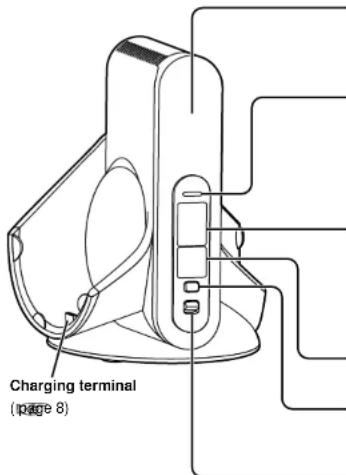
Infra-red signal transmission window
Place the transmitter where the infra-red signal transmission window can be seen with no obstruction.
POWER/CHARGE lamp (page 8)
- It glows green when infra-red rays are being emitted.
- It turns red when the headphones are being charged.
- It goes out when charging is complete or infrared rays stop being emitted.
DECODE MODE lamp (pages 12-13)
(DOLBY DIGITAL, DOLBY PRO LOGIC II DTS, MPEG-2 AAC)
The transmitter automatically distinguishes the recording method of the input signal and the DECODE MODE lamp lights.
SURROUND lamp (page 15) (MUSIC, CINEMA, VOICE)
SURROUND button (page 15)
Switch between MUSIC, CINEMA and VOICE in SURROUND MODE.
DIGITAL ANALOG control (p#e 12)
Switch between digital and analog input.
Control reference guide
Transmitter's rear panel
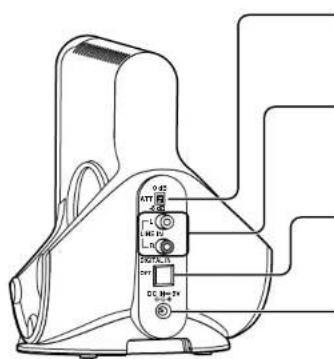
ATT control (page 11)
Switch to [0 dB] when sound from an analog input is low. The standard setting is [-8 dB].
LINE IN terminal (page 10)
To connect to the audio out terminals of AV equipment such as a video cassette recorder or television (sold separately).
DIGITAL IN terminal (page 9)
To connect to digital equipment such as a DVD player (sold separately).
DC-IN 6V terminal (page 7)
To connect to the supplied AC adapter. (Use only the supplied AC adapter. Use of other AC adapters with, for example, a different plug polarity is dangerous and can damage the unit)
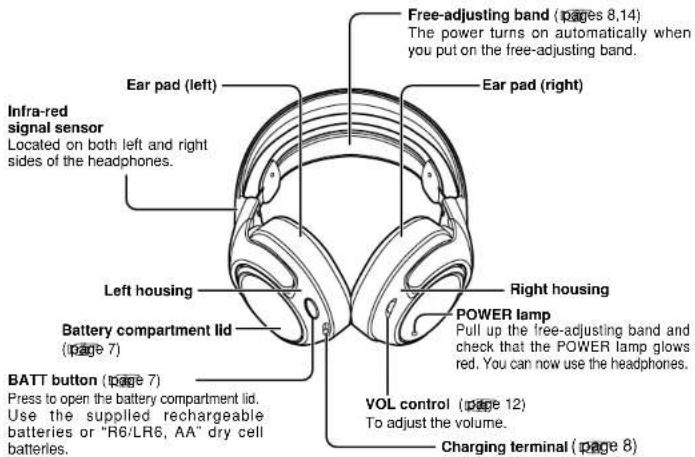
Headphones
Power Supply Preparations : Headphones
Using the rechargeable batteries (supplied)
The supplied rechargeable batteries must be charged before using this unit.
Nickel-metal hydride rechargeable batteries
Use the supplied batteries or replacement batteries (RFKFHR162SA4).
Dry cell batteries
You cannot charge dry cell batteries.
Inserting the supplied nickel-metal hydride rechargeable batteries
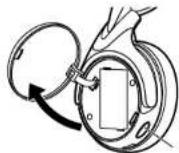
1 Press [BATT] on the right housing. The battery compartment lid will open. Do not take off the battery lid.
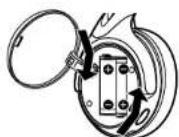
2 Insert the supplied nickel-metal hydride rechargeable batteries.
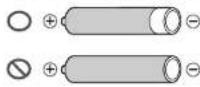
- Align the poles and correctly when inserting. - Push down on the pole spring when inserting. Remove the pole first when removing.
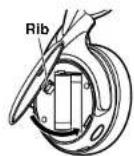
3 Close the battery compartment lid. Insert the rib in the hole and close the battery compartment lid. Push until it locks.
Charging
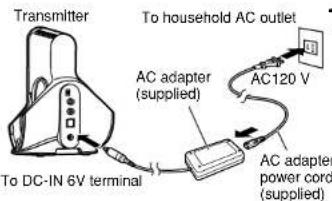
1 Connect the AC adapter (supplied) to the transmitter.
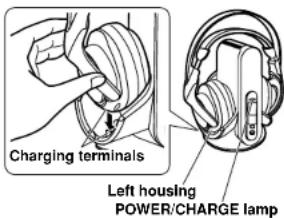
2 Put the headphones on the transmitter making sure that the charging terminals are in contact with each other.
- The POWER/CHARGE lamp on the transmitter glows red.
- The lamp goes out when the batteries are fully charged. It takes approximately 16 hours to charge the supplied batteries.
- When putting the headphones on the transmitter, hold the left and right housings in each hand and put the headphones straight down onto the transmitter.
NOTE
- During charging the transmitter is turned off automatically.
- Disconnect the AC adapter from the power outlet if the unit is not going to be used for a long time. This unit consumes a small amount of power (approximately 1.3 W) if the AC adapter is connected, even when it is turned off.
- Do not attempt to charge dry cell batteries.
- Charge the batteries in an environment with an ambient temperature between 0 °C (32 °F) and 40 °C (104 °F).
■ If the POWER/CHARGE lamp does not light up
Check that the left and right sides of the headphones are correctly placed on the left and right sides of the transmitter.
Check that the charging terminals on the headphones and transmitter are touching each other. Adjust them if they are not touching.
■ To charge the batteries after using the headphones
Put the headphones back on the transmitter. The POWER/CHARGE lamp glows red. The DECODE MODE lamp goes out approximately 1-2 seconds later and charging begins. It takes approximately 16 hours to charge the supplied batteries. The unit's internal timer will stop charging when the batteries are fully charged so leaving the headphones on the transmitter will not cause battery overcharging or damage to the unit.
NOTE
- The charging takes approximately 16 hours even if the batteries are not fully discharged.
- If you take the headphones off the transmitter while charging or after charging has finished, the charging will again take approximately 16 hours when you put the headphones on the transmitter.
■ Charging and operating times
| Charging time | Operating time*1 |
| Approx. 1 hour | Approx. 1 hour 15 minutes*2 |
| Approx. 16 hours*3 | Approx. 20 hours*4 |
■ To check the remaining battery power
Pull up the free-adjusting band and check if the POWER lamp on the right housing is dim or flashing. This means that the batteries have run down and should be replaced or charged. If the sound is distorted, intermittent or there is excessive background noise the batteries should also be replaced or charged.
* At 1 kHz, 1 mW+1 mW output.
* Time required to fully charge from empty.
* Operating times may differ depending on the temperature of the surrounding environment and operating conditions.
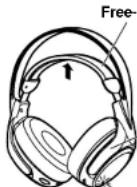
Right housing
POWER lamp
Service life for rechargeable batteries
If the duration of use for the supplied nickel-metal hydride rechargeable batteries is half the usual time after charging, the batteries have reached the end of their service life. Replace them with new batteries.
Using dry cell batteries (not included)
Use "R6/LR6, AA" dry-cell batteries.
Put the batteries into the headphones in the same way as described in Inserting the supplied nickel-metal hydride rechargeable batteries.
You cannot charge dry cell batteries even if you put the headphones on the transmitter.
■ Operating times for dry cell batteries
| Battery type | Operating time*1 |
| Alkaline battery | Approx. 34 hours*2 |
| Manganese dry cell battery | Approx. 12 hours*2 |
*1 At 1 kHz, 1 mW + 1 mW output.
^2 Operating times may differ depending on the temperature of the surrounding environment and operating conditions.
Connections
• Before connecting, turn off the digital or analog equipment.
• After connecting the digital or analog equipment to the transmitter, connect the AC adapter supplied. (page 7 [Charging] step 1)
Connecting digital equipment
Use the supplied optical digital cable to connect a television or DVD player's optical DIGITAL AUDIO OUT terminal ^4 to the transmitter's DIGITAL IN terminal ^5 :
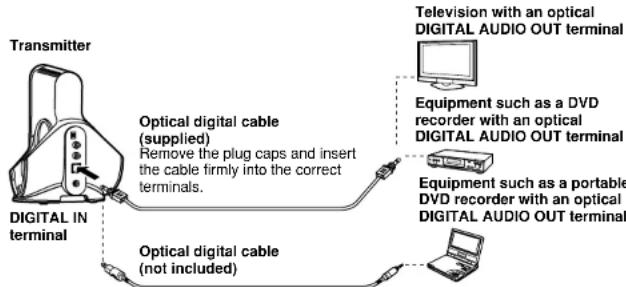
flowchart
graph TD
    A["Transmitter"] --> B["Digital IN terminal"]
    B --> C["Optical digital cable (supplied)"]
    B --> D["Optical digital cable (not included)"]
    C --> E["Remove the plug caps and insert the cable firmly into the correct terminals."]
    D --> F["Television with an optical DIGITAL AUDIO OUT terminal"]
    D --> G["Equipment such as a DVD recorder with an optical DIGITAL AUDIO OUT terminal"]
    D --> H["Equipment such as a portable DVD recorder with an optical DIGITAL AUDIO OUT terminal"]
Optical digital cable (optical mini plug) (not included)
When connecting the optical DIGITAL AUDIO OUT terminal of, for example, a portable DVD player or portable CD player to the transmitter's DIGITAL IN terminal, use the optional digital cable (mini plug to angular plug) or similar.
NOTE
* Operation is not guaranteed when connecting to a computer's optical DIGITAL AUDIO OUT terminal.
*2 When the connected equipment supports PCM output only, the surround sound will become DOLBY PRO LOGIC .II
Connections
■ Using an optical digital cable
- Do not let falling objects subject the optical digital cable to vibration or shock.
- Hold the plugs in your hands and carefully connect or disconnect the optical digital cable.
- If the ends of the optical digital cable become dirty or dusty, efficiency will decrease. Keep them clean.
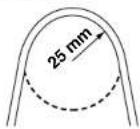
- For safety reasons, attach plug caps and do not bend the optical digital cable too much.
The optical digital cable's minimum bending radius is 25 mm.
Sound types
- A DTS compatible DVD player is necessary to play DVD discs recorded in DTS. (Refer to your DVD player's operating instructions for further details.)
- There may be some noise emitted during functions such as rewinding and fast forwarding with a DTS format DVD. This does not indicate a problem with the unit.
- If [OFF] has been selected for the DVD player's DTS digital setting, sound may not be output even when DTS output is selected in the DVD menu.
- When connecting a DVD player and this unit with an analog connection, sound may not be output. Change to a digital connection if this happens.
Connecting analog equipment
When connecting the AUDIO OUT terminals of a video cassette player, television and so on to the transmitter's LINE IN (L/R), use an audio cable.
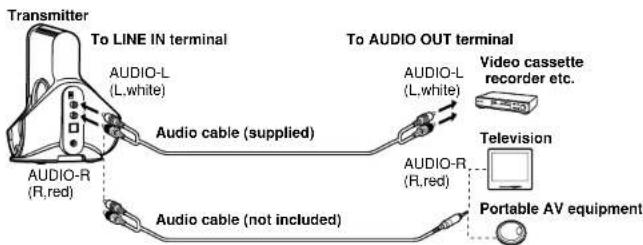
Audio cable (not included) (mini pin plug)
Use the audio cable (stereo mini plug to 2-pin plug) or similar to connect the transmitter's LINE IN terminal to a stereo mini headphone jack. On the television or portable AV equipment, If the output level from the television or portable AV equipment is set to low, there may be unwanted noise. Set the volume so the sound is not distorted.
ATT Control
When the sound is low with an analog connection, switch the ATT (attenuator) control on the Transmitter's rear panel to [0 dB].
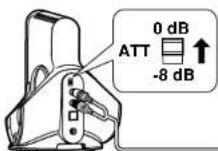
| Position | Source |
| 0 dB | Equipment with a low output level such as televisions and portable equipment |
| -8 dB | Other equipment (setting at shipment) |
NOTE
- Reduce the volume before switching the ATT control.
- If the analog sound input is distorted (there may also be noise), switch the ATT control to [-8 dB].
Placement of transmitter and headphones
This unit uses infra-red rays so use the headphones where you can see the transmitter. The approximate range of the infra-red rays between the transmitter (infra-red signal transmission window) and the headphones (infra-red signal sensor) is shown below. Please stay within these ranges.
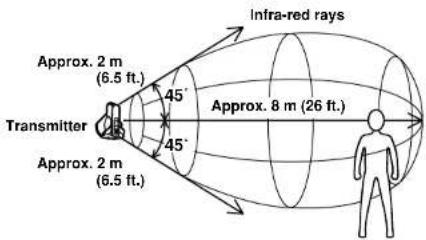
NOTE
- Infra-red rays cannot pass through walls, glass and so on.
- If the headphones are used at the outer limits of the above ranges there will be an Increase In static. There may also be static if there are any obstacles between the transmitter and the headphones. This is caused by the infra-red rays and does not indicate a problem with the unit.
- Do not cover the infra-red signal transmission window with your hands or hair.
• The placement of the transmitter, and the location where it is used, will affect what is heard on the headphones. Place the transmitter in a position where it is easy to hear the sound coming from the headphones - Do not expose the transmitter or headphones to direct sunlight. This can cause the sound to be cut-off.
- Do not expose the transmitter or headphones to light from a plasma display. If static occurs move the transmitter and headphones at least 1m (3.3 ft.) from the plasma display.
- Using more than one transmitter at the same time can cause interference.
Using the transmitter and headphones
Before using the transmitter, read Connections and ensure that it is connected correctly.
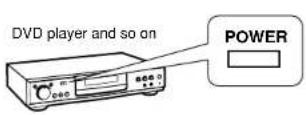
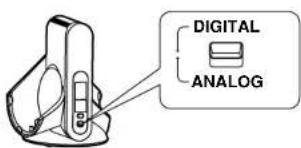
1 Turn on the equipment connected to the transmitter.
2 Select [DIGITAL/ANALOG].
DIGITAL: To hear sound from equipment connected to the transmitter's DIGITAL IN terminal.
ANALOG: To hear sound from equipment connected to the transmitter's LINE IN terminal.
NOTE
- With dual sound sources (MAIN/SUB), select the desired sound on the player or television connected through the LINE IN terminal.
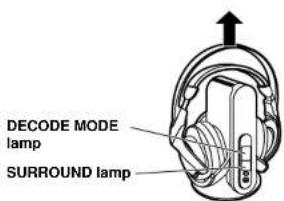
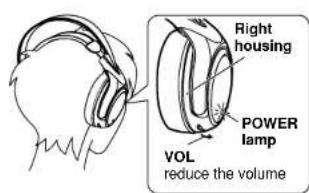
3 Take the headphones off the transmitter. The transmitter's power automatically turns on and the infra-red signal transmission window lights. The DECODE MODE lamp and SURROUND lamp will light approximately 5 seconds later to indicate the audio signal being input from the connected AV equipment and the mode selected with the SURROUND button.
4 Reduce the volume on the headphones and then put them on.
The POWER lamp on the right housing glows red and the power automatically turns on. Make sure that the headphones are facing so that the right housing (R) goes over the right ear and the left housing (L) over the left ear. Then put the headphones straight down onto your head. Doing this will ensure that the auto power on/off function works correctly.
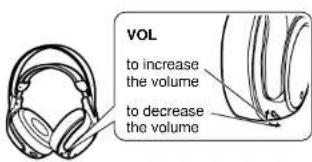
5 Start play on the equipment selected in step 2.
6 Adjust the volume on the VOL control.
NOTE
- When watching movies, be careful not to turn up the volume too high during quiet scenes. The movie may suddenly switch to a very noisy scene and you could damage your ears.
- If you disconnect the AC adapter from the transmitter before taking off the headphones, there may be static.
- When adjusting the volume be careful not to cover the infra-red signal sensor with your hand. This may cause the MUTING function to come on thus preventing volume adjustment.
■ Time required for mode changes
The actual time required for the unit to change to a particular mode after it has been selected using the slide switch on the transmitter, may vary between individual modes. This is due to different internal systems being used to change to different modes.
■ When you are unable to hear any sound from the headphones (MUTING function)
If the headphones are used outside the range of the infra-red rays, or the infra-red rays are obstructed, reception will decline and the MUTING function will come on. No sound will then be heard from the headphones. If this happens, move nearer to the transmitter. The MUTING function will automatically switch off when the infra-red rays stop being obstructed.
■ DECODE MODE lamp
The transmitter automatically distinguishes the recording method of the input signal and this lamp lights as shown below. When switching to DOLBY DIGITAL/DTS and so on, do so on the connected equipment e.g. the DVD player.
• DOLBY DIGITAL : Signals recorded in DOLBY DIGITAL format.
- DOLBY PRO LOGIC IIAnalog input signals, digital input signals (PCM 2-channel signals) and DOLBY DIGITAL 2-channel signals treated as DOLBY PRO LOGIC II (Select [OFF] in SURROUND MODE (page 15) to stop this).
• DTS : Signals recorded in DTS format. - MPEG-2 AAC : One of the audio compression formats defined by the MPEG-2 standard. Advanced audio coding is used for the sound in digital televisions.
NOTE
- When any function other than [PLAY] -such as fast-forward or rewind -is selected on the equipment connected using the DIGITAL IN terminal, the DECODE LAMP may not light correctly. If [PLAY] is selected, it will however light correctly.
Using the transmitter and headphones
■ When you remove the headphones, the power turns off automatically (Auto power on/off function).
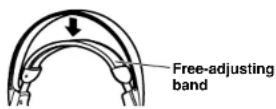
Do not pull up the free-adjusting band when not using the headphones. This may cause the auto power on/off function to switch the headphones back on and battery power to run down.
If no audio signal is received at the transmitter for more than 5 minutes (approximately)
The infra-red rays being emitted from the transmitter automatically stop and the transmitter's POWER/CHARGE lamp goes out. These infra-red rays start being emitted again when an audio signal is received. When the input audio (analog only) continues to be very low for more than 5 minutes (approximately), the infra-red rays being emitted from the transmitter may stop. If this happens, increase the volume level on the connected equipment and decrease the volume level on the headphones.
If a noise signal is input from equipment connected by the LINE IN terminal, the output of infra-red rays may be stopped.
NOTE
- The brightness of the transmitter's infra-red signal transmission window may not be uniform. This will not effect, for example, the range of the infra-red rays.
- Use the headphones within the range of the infra-red rays (page 11 [Placement of transmitter and headphones]).
- The actual location of the sound may be difficult to recognize with music and audio only sources such as music CDs.
- This unit simulates an average person's HRTF'. However individual differences in human's HRTF means that the effect of this system will vary between individuals.
*An abbreviation for Head Related Transfer Function.
Selecting the surround field
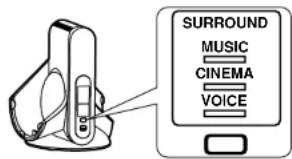
Press and hold [SURROUND] to select the desired surround mode.
Press and hold

- The SURROUND lamp for the selected mode will come on.
• This will go off, if [OFF] is selected.
| Surround mode Surround mode and suitable input source | |
| For normal headphone playOFF | |
| MUSIC | When playing music sources for enhanced acoustics. |
| CINEMA | When playing movie sources for greater audio impact. Creates a feeling close to being actually part of the scene. |
| VOICE | When playing sports game sources. Reproduces the excitement of being in a stadium at a noisy sports scene while making the sound of the announcer or commentator easier to hear. |
NOTE
• Depending on the signal being input, volume may vary when changing between surround modes.
• There is no surround effect when playing a monaural source.
Troubleshooting guide
Before requesting service, make the below checks. If you are in doubt about some of the check points, or if the remedies indicated in the chart do not solve the problem, refer to the "Product information" on page 19.
Take both the headphones and the transmitter when you visit your dealer.
| Problem | Possible cause and suggested remedy |
| No sound.Sound is low | → Check that the AC adapter is connected to the transmitter (page 7).→ Check that the transmitter and the AV equipment are connected (pages 9-11).→ Turn on the AV equipment connected to the transmitter and start play on it (pages 12-13). Check that the POWER/CHARGE lamp glows green (page 5).→ Check that the transmitter's DIGITAL ANALOG control is set correctly for the connected equipment (page 12).→ Switch the transmitter's ATT control to "0 dB" (page 11).→ If the transmitter is connected to the headphone jack, turn up the volume on the connected equipment (page 10).→ Turn up the volume on the headphones (page 13).→ The MUTING function is activated (page 13).· Check that there are no obstacles between the transmitter and the headphones.· Use the headphones near the transmitter.· Change the position and angle of the transmitter.→ If there is a plasma display near the unit, move the unit at least 1m (3.3 ft.) from the plasma display (page 11).→ The headphones' POWER lamp dims, flashes or goes off (page 8).· The rechargeable batteries have run down. Recharge them or replace the dry cell batteries with new ones. If the POWER lamp is still off, take the unit to your dealer.→ You are playing a DTS audio track on a DVD player that is not compatible with DTS (page 10).· Use a DTS compatible DVD player or select a PCM or Dolby Digital track.→ You are playing a DVD recorded in DTS audio on a DVD player (includes game machines) when "OFF" has been selected for the DVD player's DTS digital output setting (page 10).· Set the DVD player's DTS digital output setting to "ON".→ You are playing a DVD recorded in DTS audio on a DVD player (Includes game machines) connected to this unit with an analog connection (page 10).· Change to a digital connection. (Analog sound may not be output from the DVD player.) |
| Problem | Possible cause and suggested remedy |
| Sound is distorted, intermittent or there is excessive background noise. | → The headphones' POWER lamp dims, flashes or goes off. Sound is distorted, intermittent or there is excessive background noise (page 8). · The rechargeable batteries have run down. Recharge them or replace the dry cell batteries with new ones. If the POWER lamp is still off, take the unit to your dealer.→ Switch the transmitter's ATT control to "-8dB" (page 11).→ If the transmitter is connected to the headphone jack, reduce the volume on the connected equipment (page 10).→ Set "CINEMA", "MUSIC" or "VOICE" on the transmitter's SURROUND button when playing a DTS source.→ Use the headphones near the transmitter (page 11). (As you move away from the transmitter, there will be more noise. This is inherent in infra-red ray communication and does not mean that there is a problem with the unit.)→ Check that there are no obstacles between the transmitter and the headphones (page 11).→ Check that the infra-red signal transmission window is not covered with your hands or hair (page 11).→ If you use the transmitter or headphones by a window exposed to direct sunlight, draw the curtains or blinds to shut out the direct sunlight. Use the transmitter or headphones away from direct sunlight (page 11).→ Change the position and angle of the transmitter (page 11).→ When you have another transmitter, check if more than one transmitter is being used at the same time (page 11). · Turn off the other transmitter or move it to a place outside the range of this unit's transmitter.→ If there is a plasma display near the unit, move the unit at least 1m (3.3 ft.) from the plasma display (page 11). |
| No surround effect | → Set "CINEMA", "MUSIC" or "VOICE" on the transmitter's SURROUND button (page 15).→ The input audio signal is not multichannel. There is no surround effect when playing a monaural source (page 15). |
| The DOLBY DIGITAL lamp does not light. | → You have selected "PCM" for the audio digital output setting on the DVD player (includes game machines). Select "Dolby Digital/PCM" or "Dolby Digital" if the DVD player has an Internal Dolby Digital decoder.→ You are playing a signal that is not recorded in DOLBY DIGITAL format.→ The chapter being played is not DOLBY DIGITAL format. |
Troubleshooting guide
| Problem | Possible cause and suggested remedy |
| The DOLBY PRO LOGIC II lamp does not light. | → You have set the transmitter's SURROUND button to "OFF" (page 13).→ There are no analog input signals, digital input signals (PCM) or Dolby Digital 2-channel signals being input. |
| The DOLBY PRO LOGIC II lamp lights | → There are analog input signals, digital input signals (PCM) or Dolby Digital 2-channel signals being input. |
| The DTS lamp does not light. | → You have selected "OFF" for the DVD player's DTS digital output setting (page 10).· Set the DVD player's DTS digital output setting to "ON".→ You are playing a signal that is not recorded in DTS format.→ The chapter being played is not DTS format.→ The DVD player is not DTS compatible (page 10).· Use a DTS compatible DVD player. |
| Cannot charge | → The POWER/CHARGE lamp on the transmitter is not on (page 8).· Check that the headphones are put on the transmitter correctly.→ Dry cell batteries are inserted (page 9).· Insert the supplied nickel-metal hydride rechargeable batteries.→ Nickel-metal hydride rechargeable batteries other than those supplied are inserted.· Insert the supplied nickel-metal hydride rechargeable batteries or nickel-metal hydride rechargeable batteries with the same product number (page 7). |
| Infra-red ray output does not stop. | → A noise signal is being received from the connected equipment.· Turn off the power on the connected equipment. |
Maintenance
To clean this unit, wipe with a soft, dry cloth.
- Never use alcohol, paint thinner, or benzine to clean this unit.
- Before using chemically treated cloth, read the instructions that came with the cloth carefully.
Product service
Do not attempt to remove the cover(s) or repair the unit yourself. Refer servicing to qualified personnel only.
Product information
For product service, product information or assistance with product operation, refer to the servicenter directory.
Specifications
■ Transmitter (RP-WH5000T)
| Decoder function | Frequency response | |
| Dolby Digital | 18 Hz – 22,000 Hz | |
| Dolby Pro Logic II | ||
| DTS | Supplied rechargeable nickel-metal hydride batteries or commercially available (size AA) batteries | |
| MPEG-2 AAC | ||
| Surround function | ||
| OFF | Mass | |
| CINEMA | 312 g (11.0 oz.) (approx.), including supplied rechargeable nickel-metal hydride batteries | |
| MUSIC | ||
| VOICE | ||
Modulation system
| Digital infrared transmission | LANS Adapter (M. KG/110) | ||
| Transmitting frequency | 3.75 MHz | Input | AC 110-240 V, 50/60 Hz |
| Transmitting distance | 8 m (26 ft.) (approx.) | Output | DC 6 V, 1 A |
| Frequency response | 18 Hz – 22,000 Hz | Power consumption | 10 W |
Distortion factor
| Audio input |
| Optical digital Input (TOS Link type) x1 |
| Analog input (RCA type, left/right) x1 |
Power supply
| DC 6 V (using AC adapter, included) | |
| Dimensions (WxHxD) | |
| 147 mm x197 mm x147 mm(5-13/16 in. x 7-3/4 in. x 5-13/16 in.) | |
| Mass 334 | g (11.8 oz.) (approx.) |
■ Headphones (RP-WH5000H)
| Frequency response | 18 Hz – 22,000 Hz |
| Power supply | |
| Supplied rechargeable nickel-metal hydride batteries or commercially available (size AA) batteries | |
Mass
| 312 g (11.0 oz.) (approx.), including supplied rechargeable nickel-metal hydride batteries |
■ AC Adapter (RFX5176)
| Input | |
| AC 110-240 V, 50/60 Hz | |
| Output | |
| DC 6 V, 1 A | |
| Power consumption | |
| 10 W | |
Power consumption of the AC adapter in standby mode
(when connected to the transmitter) approx. 1.3 W
NOTE
Specifications are subject to change without notice. Mass and dimensions are approximate.
Estimado cliente
(2 metros (6.5 pies)
aproximadamente)


This equipment has been tested and found to comply with the limits for a Class B digital device, pursuant to Part 15 of the FCC Rules. These limits are designed to provide reasonable protection against harmful interference in a residential installation. This equipment generates, uses and can radiate radio frequency energy and, if not installed and used in accordance with the instructions, may cause harmful interference to radio communications. However, there is no guarantee that interference will not occur in a particular installation. If this equipment does cause harmful interference to radio or television reception, which can be determined by turning the equipment off and on, the user is encouraged to try to correct the interference by one or more of the following measures:
- Reorient or relocate the receiving antenna.
- Increase the separation between the equipment and receiver.
- Connect the equipment into an outlet on a circuit different from that to which the receiver is connected.
- Consult the dealer or an experienced radio/TV technician for help.
Any unauthorized changes or modifications to this equipment would void the user's authority to operate this device.
This device complies with Part 15 of the FCC Rules. Operation is subject to the following two conditions: (1) This device may not cause harmful interference, and (2) this device must accept any interference received, including interference that may cause undesired operation.
Panasonic Consumer Electronics Company, Division of Panasonic Corporation of North America One Panasonic Way Secaucus, New Jersey 07094
FOR U.S.A.
Panasonic Puerto Rico, Inc.
Ave, 65 de Infantería, Km, 9.5, San Gabriel Industrial Park, Carolina, Puerto Rico 00985
Panasonic/Technics Accessory Limited Warranty
Limited Warranty Coverage If your product does not work properly because of a defect in materials or workmanship, Panasonic Consumer Electronics Company or Panasonic Puerto Rico, Inc. (collectively referred to as "the warrantor") will, for the length of the period as follows, which starts with the date of original purchase ("warranty period"), replace it with a new or a refurbished product.
| Product | Parts | Service |
| Headphones, Earphones, Microphone, Speaker System, Cable, SBp-Mat | Ninety (90) days | Carry-in or Mali-in |
| During the "Parts" warranty period, there will be no charge for parts. You must carry-in or mail-in your product, during the warranty period. If non-rechargeable batteries are included, they are not warranted. This warranty is only applied to products purchased and serviced in U.S.A. or Puerto Rico. This warranty is extended only to the original purchaser of a new product which was not sold "as is". A purchase receipt or other proof of the original purchase date is required for warranty service. | ||
| For assistance in U.S.A.,please visit our Web Site at: http://www.pacc.panasonic.comor, send your request by E-mail to: npcparts@us.panasonic.comYou may also contact us directly at: 1-800-332-5388 (Phone) or 1-800-237-9080 (Fax) (Monday - Friday 9 am - 8 pm, EST). Panasonic Services Company: 20421 84th Avenue South, Kent, WA 98032 ( For hearing or speech impaired TTY users. TTY: 1-866-605-1277 ) |
| For assistance in Puerto Rico, please contact at: (787) 750-4300 (Phone) or (787) 768-2910 (Fax) Panasonic Puerto Rico, inc. |
Limited Warranty limits And Exclusions The warranty ONLY COVERS failures due to defects in materials or workmanship, and DOES NOT COVER normal wear and tear or cosmetic damage. The warranty ALSO DOES NOT COVER damages which occurred in shipment, or failures which are caused by products not supplied by the
warrantor, or failures which result from accidents, misuse, abuse, neglect, mishandling, misapplication, alteration, faulty installation, set-up adjustments, misadjustment of consumer controls, improper maintenance, power line surge, lightning damage, modification, rental use of the product, serviced by anyone other than a Factory Service Center or other Authorized Serviceer, or damage that is attributable to acts of Gods.
THERE ARE NO EXPRESS WARRANTIES EXCEPT AS LISTED UNDER "LIMITED WARRANTY COVERAGE". THE WARRANTOR IS NOT LIABLE FOR INCIDENTAL OR CONSEQUENTIAL DAMAGES RESULTING FROM THE USE OF THIS PRODUCT, OR ARISING OUT OF ANY BREACH OF THIS WARRANTY, INCLUDING WITHOUT LIMITATION, LOSS OF GOODWILL, WITHOUT REQUIPMENT, AND UPWARD IN ACCORDANCE. THE TAXES OF THIS DOCUMENT AND ASSOCIATED EQUIPMENT, COST OF SUBSTITUTE EQUIPMENT, DOWNTIME COSTS, OR CLAIMS OF ANY PARTY DEALING WITH BUYER FOR SUCH DAMAGES. (As examples, this excludes damages for last time, cost of having someone remove or re-install an installed unit if applicable, travel to and from the services. The items listed are not exclusive, but are for further information and information contained in accordance with the requirements, including THE WARRANTIES OF MERCHANTABILITY, ARE LIMITED TO THE PERIOD OF THE LIMITED WARRANTY.
Some states do not allow the exclusions or limitations of incidental or consequential damages, or limitations on how long an implied warranty lasts, so the exclusions may not apply to you.
This warranty gives you specific legal rights and you may also have others rights which vary from state to state. If a problem with this product develops during or after the warranty period, you may contact your dealer or ServiCenter. If the problem is not handled to your satisfaction, then write to the warrantor's Consumer Affairs Department at the address listed for the warrantor.
PARTS AND SERVICE WHICH ARE NOT COVERED BY THIS LIMITED WARRANTY ARE YOUR RESPONSIBILITY
AVC200412
Panasonic Consumer Electronics Company,
Division of Panasonic Corporation of North America
One Panasonic Way Secaucus,
New Jersey 07094
http://www.panasonic.com
Matsushita Electric Industrial Co., Ltd.
Corporate Management Division for the Americas
Sales Office for North America
Tokyo Panasonic Sales Section
32nd Floor. World Trade Center 4-1, Hamamatsu-cho. 2-Chome. Minato-Ku. Tokyo 105-6132, Japan
© 2005 Matsushita Electric Industrial Co., Ltd.
Printed in China/Impreso en China/Impresso em China
Panasonic Puerto Rico, Inc.